
Picture this: you ask Claude Code to “fix the failing test in the checkout flow.”
You don’t get an answer back. You get activity. It opens the test file. It runs the test suite. It reads the stack trace. It opens the component the trace points to, edits one line, runs the tests again, and only then comes back with: “Fixed. The discount was being applied twice.”
Nobody told it which file to open, which command to run, or when to stop. It worked that out on its own, one step at a time.
That’s the difference between asking an AI a question and handing a task to an agent. This guide walks through what’s actually happening in that loop, and how to set agents up so they do more of the work for less.
Single prompt vs. agent
A single prompt is one round trip. You send a prompt, the model sends a response, and that’s it. If you want something done, you copy the answer out and do it yourself.
An agent runs that round trip in a loop, toward a goal. Each response from the model is either an action to take (read a file, run a command, search the web, edit code) or a final answer. The agent carries out the action, feeds the result back to the model, and asks it again.
If you’ve used Claude Code or Codex on a project, you’ve already used agents. The point of this guide is to help you use them deliberately.
The agent loop
Every agent runs the same basic cycle:
- Gather context. Read your message, the project’s instruction files, and anything else it needs to decide what to do.
- Pick the next action. Usually a tool call: run a script, read a file, grep the codebase.
- Execute it. The tool runs and returns output.
- Observe. That output is added to the context.
- Repeat until there’s nothing left to do.
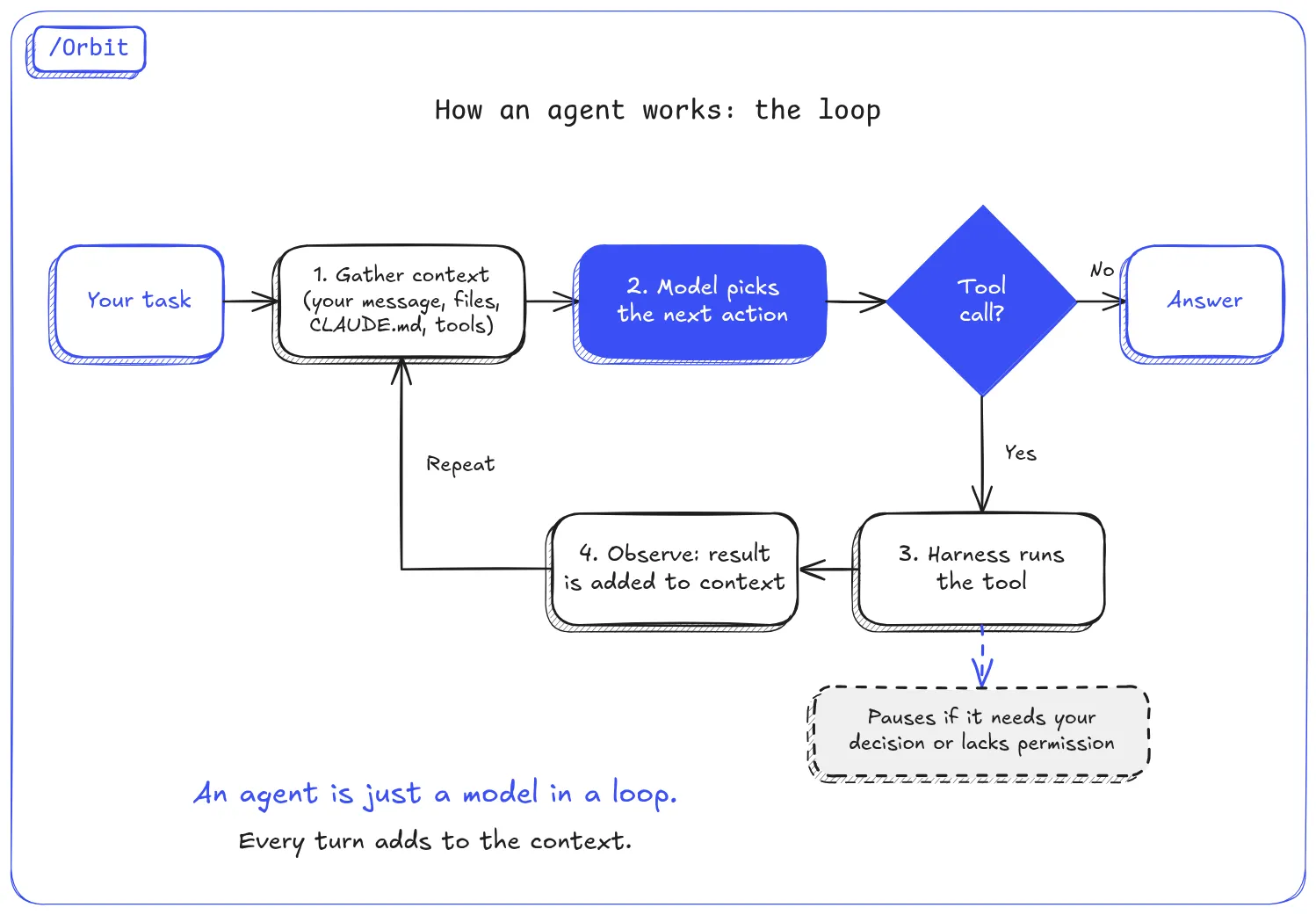
The loop stops for one of three reasons:
- The job is done. The model decides it has an answer and makes no more tool calls.
- It needs you. There’s a decision only you can make.
- It’s blocked. A permission rule stops it from taking the next action.
See it for yourself
You can watch the loop’s stats by running Claude Code headless with JSON output. Here’s a real run against this blog’s own repo:
claude -p "How many markdown posts are in src/content/posts? Reply with just the number and the file names." \
  --output-format json \
  --allowedTools "Bash(ls:*)" "Glob"
The output is a lot of JSON. Trimmed down to the fields that matter:
{
  "subtype": "success",
  "num_turns": 2,
  "stop_reason": "end_turn",
  "terminal_reason": "completed",
  "duration_ms": 6006,
  "total_cost_usd": 0.18,
  "usage": {
    "cache_creation_input_tokens": 21252,
    "cache_read_input_tokens": 39162,
    "output_tokens": 242
  },
  "result": "8\n\n- fast-decision-model-mobile-qa.md\n- ..."
}
Three things to read here:
num_turns: 2is the loop. One turn to list the files, one to answer.stop_reason: "end_turn"is why it stopped. The model decided the job was complete. Nothing blocked it and it didn’t need anything from you.usageis the surprise. A one-line question used about 60,000 input tokens. That’s not the question; it’s everything the agent loads before it starts. More on that in a moment.
The model vs. the harness
Two pieces work together in every agent, and it helps to keep them separate in your head:
| What it is | Example | |
|---|---|---|
| Model | The intelligence. Reads the context and decides what to do next. | Claude Sonnet, Claude Opus, GPT models |
| Harness | The body. Turns the model’s decisions into real actions: running tools, editing files, asking permission, showing you progress. | Claude Code, Codex CLI |
The same model can behave differently in different harnesses, because each harness gives it different tools, different system instructions and different ways of managing context. When an agent does something odd, ask which half was responsible: did the model make a bad call, or did the harness give it the wrong tools or too little context?
Context is the resource you’re really spending
Context is everything the agent can see when it makes its next decision: your messages, its own earlier responses, every tool result, its instruction files, and the descriptions of every tool it has.
Two things about context catch beginners out.
1. It grows with every step. The whole context is sent to the model on every turn of the loop. Each file read and each command output gets added to it. Caching makes repeated tokens much cheaper (look at cache_read_input_tokens above), but a long session still gets slower, more expensive and less focused. In Claude Code, /compact summarises the conversation so far and /clear starts fresh. Use them between unrelated tasks.
2. Some of it is loaded before you type anything. That 60,000-token startup in the example comes from three places:
- Instruction files. Claude Code reads
CLAUDE.md, and Codex readsAGENTS.md, at the start of every session. - Tool definitions. The agent has to know what every tool does, so their descriptions sit in context.
- MCP servers. Every connected MCP server adds its tools to that list.
Keep instruction files lean
Don’t put everything in CLAUDE.md. Point to detail instead of including it:
# CLAUDE.md

## Project layout
- Web app: `apps/web` (Next.js)
- Mobile app: `apps/mobile` (React Native)

## Before working on the mobile app
Read `docs/mobile.md` for build steps and device setup.

## Before touching billing
Read `docs/billing.md`. Never change prices without asking.
One catch: in Claude Code, an @docs/mobile.md import is loaded straight into context at startup, so it doesn’t save anything. A plain sentence telling the agent when to read the file does. For rules tied to specific folders, Claude Code also supports path-scoped rules in .claude/rules/ that load only when the agent touches matching files.
Keep the tool list relevant
MCP tools aren’t free. DBHub, a database MCP server, publishes its numbers: its 2 default tools take about 1.4k tokens, against roughly 19k for some alternatives that expose dozens. Multiply that by every server you have connected. Turn off the ones a project doesn’t need.
Permissions and tools
An agent can only do what its harness allows. In the example above, --allowedTools "Bash(ls:*)" "Glob" let the agent list and find files and nothing else. If it had tried to delete something, the action would have been denied, and the denial would show up in the JSON output.
Two habits pay off early:
- Start narrow. Give an agent the smallest set of tools that gets the job done. A reviewer doesn’t need
Write. - Let permissions stop the loop for you. When an agent hits a permission it doesn’t have, it stops and asks. That’s a feature: it’s the loop’s built-in checkpoint before anything risky.
Subagents vs. skills
Once a task comes up often, you’ll want to package it. There are two ways, and they work very differently.
A subagent is a separate agent with its own context window, its own instructions and its own tools. Your main agent hands it a task, it goes away and does the work, and it hands back only the result.
A skill is a set of instructions the main agent reads into its own context and then follows itself.
Take a common task: run the tests and verify the change.
| As a subagent | As a skill | |
|---|---|---|
| Who does the work | A separate test-runner agent | Your main agent |
| Where test output goes | Into the subagent’s context | Into your main context |
| What the main agent gets back | ”3 tests failed: …” | Every line of test output |
| Can run in parallel | Yes | No |
| Startup cost | Yes, a new agent has to boot | Small, just the skill’s text |
That’s the real reason to use subagents: they’re a context management tool. Test logs, search results and long web pages stay in the subagent’s context, so your main agent stays focused on the actual task.
A real example: researching this blog’s existing posts for a previous article took a web-reading subagent 10 tool calls and about 26k tokens. The main conversation got back a one-page summary instead of eight raw web pages.
Subagents have a cost
Subagents aren’t free, and beginners tend to overuse them.
- Startup cost. Every new agent loads its own system prompt, tools and instruction files before it does anything. In one test, a general-purpose research subagent started at around 70,000 tokens before doing any work.
- Handoff cost. Your main agent has to explain the task, and the subagent has to report back. If either side misunderstands, you pay again for the retry.
So don’t spawn a subagent to read one file or run one command. Use one when the work would otherwise flood your main context with output you don’t need to keep.
Define a narrow agent
The fix for that startup cost is a custom subagent with a deliberately narrow job. In Claude Code, it’s a Markdown file in .claude/agents/ (for one project) or ~/.claude/agents/ (for all your projects):
---
name: test-runner
description: Runs the test suite and reports failures. Use after code changes.
tools: Bash, Read, Grep
model: sonnet
maxTurns: 10
---

You run tests and report results. You don't fix anything.

1. Run `pnpm test`.
2. If everything passes, reply "All tests pass" and stop.
3. If anything fails, list each failing test with the file, the assertion
   and the first line of the error. Nothing else.
The frontmatter is where the savings come from:
descriptiontells the main agent when to use it. Claude Code delegates automatically when a task matches.toolskeeps it to three tools instead of everything, so less context and less that can go wrong.modellets you run routine work on a smaller, cheaper model.maxTurnscaps how long its loop can run.
In the same test, narrow agents like this started at around 20–30k tokens instead of 70k. They also start out already knowing their job, so there’s less back-and-forth.
You don’t have to write these by hand. Ask Claude: “Create a read-only test-runner subagent in .claude/agents/ that uses Sonnet.” Then review what it writes.
One definition, every harness
If you use both Claude Code and Codex, you don’t want two copies of every agent drifting apart. Keep the real instructions in one shared place, and make each harness’s own definition a thin pointer to them:
agents/
  test-runner.md            ← the actual instructions, harness-neutral
.claude/agents/
  test-runner.md            ← Claude Code wrapper
AGENTS.md                   ← Codex reads this
The Claude Code wrapper is just frontmatter plus one line:
---
name: test-runner
description: Runs the test suite and reports failures. Use after code changes.
tools: Bash, Read, Grep
model: sonnet
---

Read `agents/test-runner.md` and follow it exactly.
The same trick works for project instructions. Claude Code can share one file with other tools: put @AGENTS.md at the top of your CLAUDE.md, or symlink one to the other.
Then ask your agent to review each wrapper for harness-specific problems, such as a model name the other tool doesn’t recognise. Do the same for skills.
Rules of thumb
- Clear or compact between unrelated tasks. Context you don’t need still costs you on every turn.
- Point to detail; don’t load it. Keep
CLAUDE.mdandAGENTS.mdshort. - Prune your MCP servers. Every tool you don’t need is noise the model has to read past.
- Use a skill when the main agent needs to know how to do something.
- Use a subagent when the work produces output the main agent doesn’t need to see.
- Make subagents narrow: few tools, a small model where it’s enough, and a capped loop.
If you do everything from your main agent, you’ll fill its context and get slower, worse results. If you spin up a subagent for everything, you’ll pay startup costs for nothing. The skill is knowing which work to hand off.
An agent is just a model in a loop. What you get out of it depends on what you put into that loop.